Showing posts with label dexster. Show all posts

Wednesday, May 31, 2023

Dexster Audio Editor 5.1 - New Released!

We are delighted to bring you exciting news and unveil the latest version of Dexster Audio Editor 5.1 which can be downloaded at https://www.dexster.net . The latest update includes enhanced support for a wider range of audio devices, as well as new and improved audio recording visualizations and VU meters.

With Dexster Audio Editor 5.1, you now have the capability to save audio in WAV 24-Bit, 32-Bit, and 32-Bit Float format across all modules. In the upgraded Dexster Audio Editor 5.1, the Batch Automations feature has been further enhanced. Notably, new capabilities include insertion of silence and muting features, providing users with more control and flexibility in editing audio files in bulk.

Additionally, the latest update includes further improvements that address and resolve issues related to VST loading and applying errors. These enhancements ensure a smoother experience when working with VST plugins, eliminating any previous issues or errors encountered during the loading and application process. This update is highly recommended to ensure you're getting the best performance possible from Dexster Audio Editor. Please visit https://www.dexster.net/upgrade.html to learn more about recent updates.

New Audio Recording feature in Dexster Audio Editor 5.1

 New Audio Recording feature in Dexster Audio Editor 5.1

New features and updates in Dexster version 5.1:

  1. Enhanced support for a wider range of audio devices new
  2. New and improved audio recording visualizations and VU meters new
  3. Option to save audio as WAV 24-Bit, 32-Bit, and 32-Bit Float format across all modules new
  4. Batch automation for convenient insertion of silence and muting features new
  5. Fixed: Resolved issues related to VST loading and applying errors
  6. Fixed: Corrected discrepancies in the displayed audio attributes, ensuring accurate information is provided
  7. Improved: Revamped the screen design to accommodate larger displays
  8. Improved: Several other improvements and fixes
  9. Updated: User Manual

Free Download: https://netdna.dexster.net/audioeditor.exe

Website: https://www.dexster.net

Buy Now: https://www.dexster.net/order.html


Sunday, April 11, 2021

Dexster Audio Editor 4.9 New Released

Dexster Audio Editor 4.9 New Released

We are pleased to announce the released of Dexster Audio Editor 4.9 which can be downloaded at https://www.dexster.net . Dexster Audio Editor 4.9 introduces a new Batch Automation feature that can be used to automate your audio editing task. This feature is very useful, especially when you need to make the same edits to multiple audio files, all at once. So, whether you’re looking to adjust audio amplification, delete silence, normalize, remove start / end parts, reverse, or apply band pass / low pass / high pass filters, Dexster Audio Editor 4.9 has got you covered. The latest update also includes a new shortcut functionality to copy as new waveform, bug fixes related to markers, and further improvement to both the user interface and experience. This update is highly recommended to ensure you're getting the best performance possible from Dexster Audio Editor. Please visit https://www.dexster.net/upgrade.html to learn more about recent updates. 

Dexster Batch Automation

New features and updates in Dexster version 4.9: 

  • Batch Automation feature (amplify, delete silence, normalize, tempo, trim, reverse, band pass, low pass, high pass) that can be used to automate your audio editing task. new
  • Copy to New waveform shortcut new
  • Fixed: Issues related to markers    
  • Improved: Minor GUI update
  • Improved: Several other improvements and fixes
  • Updated: User manual

Website

Free Download

Buy Now


Wednesday, November 21, 2018

Dexster Audio Editor 4.7 - New Released!

We are pleased to announce that a brand new version of Dexster Audio Editor 4.7 is now available for download at http://www.dexster.net . Dexster Audio Editor 4.7 introduces several new features and improvements. New in this version is the Frequency Analysis feature which can be used for visual analysis of frequency characteristics of an audio file.

We've redesigned the main interface of Dexster Audio Editor by adding the options to customize the waveform selection range and viewing range. This will help to speed up your editing task.

This update also improves the Tempo feature where it will now provide an estimation of the new duration before applying the effect. In addition, playback time, recording time, selection range time, viewing range time and current cursor position will now display in the format of hh:mm:ss:ms. In the previous versions, the format hh:mm:ss was used.

Version 4.7 also incorporates fixes for reported bugs, and other enhancements. Please visit http://www.dexster.net/upgrade.html to learn more about recent updates.

Audio Frequency Analysis in Dexster Audio Editor 4.7

New features and updates in Dexster version 4.7:
  •  Audio Frequency Analysis feature new
  •  Option to set Waveform selection range under the Control new
  •  Option to set Waveform viewing range under the Control new
  •  Option to play "Notify" sound upon completion on Audio CD Extraction new
  •  Fixed: The value of current cursor position not updating
  •  Improved: Tempo adjustment will now provide an estimation of the new duration
  •  Improved: Recording time will now display in hh:mm:ss:ms format
  •  Improved: Playback time and current cursor position will now display in hh:mm:ss:ms format
  •  Improved: Batch Conversion, File Merger, Audio CD Extraction, and Export Multiple will now select MP3 as the default output format
  • Improved: Status bar will now display viewing time and selection time in hh:mm:ss:ms format

Website:
http://www.dexster.net/


Download:
http://netdna.dexster.net/audioeditor.exe

Buy Now:
http://www.dexster.net/order.html


Tuesday, May 17, 2016

Dexster Audio Editor 4.5 New Released

Dexster 4.5
We are pleased to announce that a brand new version of Dexster Audio Editor 4.5 is now available for download at http://www.dexster.net . Dexster Audio Editor 4.5 introduces several new features and also important updates. With this version, you may now send the recorded or edited audio file directly to your FTP server without needing a third party tool. This version also includes a new option to normalize audio on the batch audio conversion feature.

An important update in Dexster Audio Editor 4.5 is the replacement of the code signing certificate. The old versions were signed with SHA1 certificate and it will no longer be supported by Windows starting from 1st January 2017.

In addition, Dexster now supports Windows 10 (32/64-bit). Minor bugs found in previous versions and Windows 10 have been fixed in this release. Please visit http://www.dexster.net/upgrade.html to learn more about recent updates.

Send audio file to FTP server
Send Audio File to FTP Server in Dexster Audio Editor 4.5    

New features and updates in Dexster version 4.5:    
  • New: Send audio file to FTP server new
  • New: Audio normalization feature on batch conversion new
  • Improved: New code signing to replace the old SHA1   
  • Improved: FLAC encoder   
  • Improved: Dexster has been tested and compatible to run on Windows 10 (32/64-bit)
  • Improved: Several other improvements and fixes   
  • Updated: User help manual

Free Download:
http://netdna.dexster.net/audioeditor.exe

Website:
http://www.dexster.net

Version History:
http://www.dexster.net/upgrade.html


Wednesday, March 18, 2015

Dexster Audio Editor 4.4 - New Released

We are pleased to announce the release of the Dexster Audio Editor 4.4 which is available for download at http://www.dexster.net . Version 4.4 introduces a new Expander feature. Expander effects can be very helpful when you need to reduce or even eliminate the unwanted noise in a recording. We've added several ready-made presets (Cassette Noise Reduce, Expand For Music, Soft Expand for Music, Voice Breath Reduce) which will be useful for your editing task.

This update also brings back the option to adjust audio amplification in percentage level. You can either use dB or percentage when adjusting the audio amplification. Other improvements include better Delete Silence feature where you can now specify the silence level to be removed.

Version 4.4 also incorporates fixes for reported bugs, and other enhancements. Please visit http://www.dexster.net/upgrade.html to learn more about recent updates.


Expander effects
New Expander feature in Dexster Audio Editor 4.4


New features and updates in Dexster version 4.4
  • New: Expander effects new
  • New: Ready-made presets for Expander (Cassette Noise Reduce, Expand For Music, Soft Expand for Music, Voice Breath Reduce) new
  • Improved: Delete Silence feature improvement with the option to set silence criteria and ready-made presets (Audiobook, Trim Edges)
  • Improved: Amplification adjustment can now based on dB or percentage
  • Improved: Increased recent file history on File menu
  • Improved: Preset editor for Delete Silence
  • Improved: Several other improvements and fixes
  • Updated: User help manual


Free Download:
http://netdna.dexster.net/audioeditor.exe

Website:
http://www.dexster.net

Version History:
http://www.dexster.net/upgrade.html


Thursday, September 04, 2014

Dexster Audio Editor 4.3 - Released!

The latest Dexster release is now available for download at http://www.dexster.net . New in this release is the support of high DPI screen 125% (120 DPI), and 150% (144 DPI). This new support is important as high DPI displays are getting more and more common.

This release also adds a new label option for marker. With a label, you can add a short note or description for each marker. Dexster 4.3 also contains a couple of bug fixes such as zooming issue with mouse wheel, VST interface not displaying properly, missing markers and other minor bugs.

Please visit http://www.dexster.net/upgrade.html to learn more about recent updates.

125% ( 120 DPI ) and 150% ( 144 DPI )

New features and updates in Dexster version 4.3:
  1. New: Interface is now 125% (120 DPI), and 150% (144 DPI) compatible new
  2. New: Option to add label to a marker new
  3. Fixed: Zooming on waveform with mouse wheel
  4. Fixed: Markers not correctly listed
  5. Fixed: VST interface does not display properly
  6.  Improved: Several other improvements and fixes
  7.  Updated: User help manual


Free Download:
http://netdna.dexster.net/audioeditor.exe

Website:
http://www.dexster.net

Version History:
http://www.dexster.net/upgrade.html


Wednesday, February 12, 2014

Dexster Audio Editor 4.2 - Released!

We're pleased to announce the immediate availability of the Dexster Audio Editor 4.2 which is available for download at http://www.dexster.net . Dexster 4.2 adds the incredible new Text to Speech feature. This new functionality will allow you to convert text into speech / audio and is accessible by clicking on the Tools menu, Text to Speech.

With Dexster 4.2, you can now increase / decrease sound volume based on dB scaling or percentage. You can also set the initial and final amplification for the fading effects. A new set of presets made for a specific purpose have been added for the Amplify and Fading features.

Version 4.2 also incorporates fixes for reported bugs, and minor design improvements. Please visit http://www.dexster.net/upgrade.html to learn more about recent updates.


New Text to Speech feature in Dexster Audio Editor 4.2


New features and updates in Dexster version 4.2:
  1. New Text to Speech feature. new
  2. Improved: Amplify feature improvement. You may now increase / decrease sound volume in dB scaling
  3. Improved: Fade in / out feature improvement with the options to set initial and final amplification.
  4. Improved: New Waveform settings (frequency, channel) will be saved and remembered.
  5. Improved: Preset editor for Amplify, Fade in, and Fade out
  6. Improved: Several other improvements and fixes
  7. Updated: User help manual

Free Download:
http://netdna.dexster.net/audioeditor.exe

Website:
http://www.dexster.net

Version History:
http://www.dexster.net/upgrade.html


Wednesday, July 17, 2013

Dexster Audio Editor 4.1 Released

We are pleased to announce that a brand new version of Dexster Audio Editor 4.1 is now available for immediate download at http://www.dexster.net . New in this release is the new Repeat Loop feature. Repeat Loop is useful to create a seamless loop of audio ( same audio to repeat over and over ). 

With the new Dexster Audio Editor 4.1, you can create / manage your own preset for Tempo, Amplify, Normalize, and Pitch Shift. A new set of presets for a specific purpose eg. Female Voice, Male Voice, Chipmunk Voice, Half Volume, Double Volume, Half Speed, Double Speed, Normalize to 100% have been added. 

Other improvements in Dexster Audio Editor version 4.1 include incorporating fixes for reported bugs, and minor interface design updates. Please visit http://www.dexster.net/upgrade.html to learn more about recent updates. 

New Features in Dexster Audio Editor 4.1

New features and updates in Dexster version 4.1:
  •  New Repeat Loop feature. Use repeat loop feature to create a seamless loop of audio. new 
  • Improved: Pitch Shift feature improvement with ready-made presets (Female Voice, Male Voice, Chipmunk Voice)
  • Improved: Amplify feature improvement with ready-made presets (Quarter Volume, Half Volume, Double Volume, Triple Volume)
  • Improved: Stretch feature has been renamed as Tempo
  • Improved: Tempo feature improvement with ready-made presets (Half Speed, Double Speed)
  • Improved: Normalize feature improvement with ready-made presets (Normalize to 100%, Normalize to 80%)
  • Improved: Preset editor for Pitch Shift, Amplify, Tempo and Normalize
  • Improved: Several other improvements and fixes
  • Updated: User help manual

Free Download:
http://netdna.dexster.net/audioeditor.exe

Website:
http://www.dexster.net

Version History:
http://www.dexster.net/upgrade.html


Monday, February 25, 2013

Dexster Audio Editor 4.0 - Released!

Today, we're pleased to announce that the next version of Dexster Audio Editor, 4.0 is available for immediate download at http://www.dexster.net . We've added new features that will make it simpler to split audio file (Export Multiple). You can access to this new feature by clicking on the File menu, Export Multiple. Export Multiple can be used to split long audio tracks based on the given duration of time, pause / silence detection in between, markers, or split averagely to several files. In addition, you can also customize the output file names.

Other improvements in Dexster Audio Editor version 4.0 include the support of audio format M4A, FLAC, MP4, and AAC on Audio CD Burning and Audio Merging features. Version 4.0 also incorporates fixes for reported bugs, and minor interface design updates.

Please visit http://www.dexster.net/upgrade.html to learn more about recent updates.

New Export Multiple Feature in Dexster Audio Editor 4.0

New features and updates in Dexster version 4.0:
  1. New: Export multiple feature. Export and split audio file according to duration time, averagely, markers and silence detection. new
  2. Improved: Audio CD burning now accept audio format M4A, AAC, FLAC, MP4
  3. Improved: Audio Merging now support audio format M4A, AAC, FLAC, MP4, CDA
  4. Improved: Save Selection As has been renamed to Export Selection.
  5. Fixed: Problem to edit short audio files if default program is set to Dexster.
  6. Updated: User manual
Website: http://www.dexster.net

Download: http://netdna.dexster.net/audioeditor.exe


Wednesday, December 19, 2012

Dexster Audio Editor 3.9 New Released


We are proud to announce that a new version of Dexster Audio Editor was released today.  

Version 3.9 of Dexster Audio Editor can be downloaded from http://www.dexster.net . This update includes the support of 24-bit / 32-bit WAV audio file and improves the support for large audio file.

In addition, we've fixed audio distortion issue when low quality audio is imported for audio CD burning. Version 3.9 also incorporates fixes for reported bugs, performance improvement on audio CD burning, audio merging, and batch audio conversion features.

Please visit http://www.dexster.net/upgrade.html to learn more about recent updates.

New features and updates in Dexster version 3.9:
  • New: 24-bit / 32-bit WAV audio is now supported new 
  • Improved: Better support for large audio file
  • Fixed: Distorted audio issue when low quality audio is imported for audio CD burning
  • Fixed: Incorrect Start / End extraction label value
  • Fixed: Minor bugs found in previous version
  • Updated: User manual

Website: http://www.dexster.net

Download: http://netdna.dexster.net/audioeditor.exe

Friday, July 13, 2012

Dexster Audio Editor 3.8 - New Released

We are proud to announce the released of Dexster Audio Editor 3.8. Dexster 3.8 features a complete make over of the audio extraction from video feature.

You may now use Dexster Audio Editor to extract popular video formats such as MPEG, MOV, MP4, VOB, MTS, MKV, AVI or WMV and save it as audio MP3, WAV, WMA, OGG, or AAC.  The saved audio file can then be used for audio editing purpose.

Dexster Audio Editor 3.8 is now compatible to run on Windows 8 (32/64-bit). Bugs that we found in previous version and Windows 8 have been fixed in this release.

Please visit http://www.dexster.net/upgrade.html to learn more about recent updates. 


New features and updates in version 3.8:
1) A complete makeover of the audio extraction from video feature. The following video formats are now supported for audio extraction: new
  • AVI
  • MPEG
  • WMV, ASF
  • MOV, QT
  • MP4, M4V
  • 3GP, 3G2
  • FLV, F4V
  • DAT
  • MKV
  • VOB
  • OGM, OGV
  • AVCHD (M2TS, M2T, MTS, TS)
  • WEBM
2) Improved: Dexster now runs on Windows 8 (32/64-bit) 
3) Fixed: Minor bugs found in previous version
4) Updated: User manual


Website: 
 http://www.dexster.net

Download:
http://netdna.dexster.net/audioeditor.exe

Version History:
http://www.dexster.net/upgrade.html

Wednesday, April 25, 2012

Windows 8 Support in Softdiv Products

As you probably know, Microsoft will be releasing the new Windows 8 by this year. Since the consumer preview version of Windows 8 is already available, we managed to download and performed a test run of our products on Windows 8 (32-bit and 64-bit).

We are glad to announce that our products (Dexster, Videozilla, Photopus Pro, Snosh, Audiozilla, Recordzilla) are compatible with Windows 8 (32-bit and 64-bit). No major issues were found during the test. Of course, it is still early to do the real testing of our products on Windows 8. We'll be conducting the test again once the final release of Windows 8 hits the shelves.

Audiozilla Audio Converter running on Windows 8
Dexster Audio Editor running on Windows 8
Photopus Pro running on Windows 8
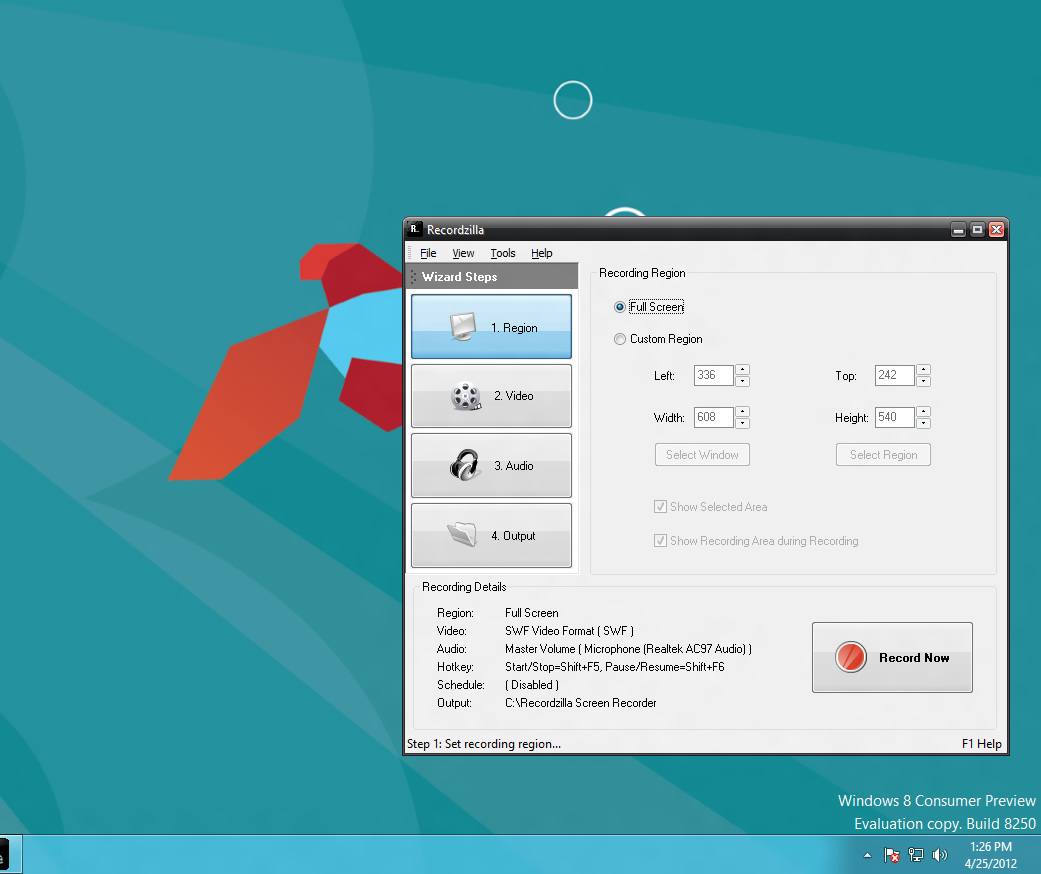
Recordzilla Screen Recorder running on Windows 8
Snosh running on Windows 8
Videozilla Video Converter running on Windows 8 


Thursday, March 29, 2012

Dexster Audio Editor 3.7 - Released

We’re happy to announce the latest version of Dexster Audio Editor 3.7 is available for
download at http://www.dexster.net . In this update, we completely redesigned Dexster Audio Editor’s user interface, making the audio editing environment easier and more enjoyable.

Dexster Audio Editor 3.7 is now optimized for high-resolutions screens (1024 x 768 and more). This will bring a polished, modern feel to the user interface. This new version also added a new set of icons which are bigger, cleaner and smoother. 

Please visit http://www.dexster.net/upgrade.html to learn more about recent updates. 


New features and changes in Dexster version 3.7:
1) A complete makeover of Dexster user interface new
2) Improved: Bigger, cleaner, and smoother icons
3) Improved: Resizable in normal windowstate
4) Improved: Optimized for bigger resolutions
5) Improved: Stability and performance
6) Fixed: Minor bugs found in previous version
7) Updated: Help manual  


Website: http://www.dexster.net


Free Download: http://netdna.dexster.net/audioeditor.exe


Tuesday, November 08, 2011

How to make audio book

If you want to know the best way on how to make audio book, then you have come to the right place. An audio book is a recorded version of a print book. There are many advantages of having an audio book, one of which is that it can make you to earn extra money from time to time. Through audio books, many people have built successful home businesses generating a promising incoming every month.

If you want to start making your own audio book like thousands of people are already doing, you need to learn how to make audio book. At the same time, it is necessary to use an important tool like Dexster Audio Editor. Let's quickly look at how you can use this wonderful software to make your audio book.

Step 1 - you need to be familiar with the vocabulary and the pacing of the software.

Step 2 - you need to read slowly. Doing that will make your reading to be normal to those listening to you.

Step 3 - do not speak in a monotone. You should keep your listener engaged by changing the pitch. This helps in making the listener to understand what you're saying.

Step 4 - you need to choose the format for your audio book. Most people now use MP3 and CDs because they are the most common.

Dexster Audio Editor is the best software that can help you to make your own audio book. A good thing about it is that it is user-friendly, and you do not need technical knowledge to work with it. Many people always recommend that one should always have an engineer or an expert to make an audio book. But with Dexster Audio Editor, you do not need any of those things. These are some of the important features that you will have with Dexster Audio Editor:

- Support for the editing of multiple files at the same time 

- Use a microphone or other input devices to record an audio file 

- Convert your audio file through different formats. Another good thing is the conversion of audio files in batches.

Dexter Audio Editor is a very good software that helps in making audio book. The software even has Recording Timer that helps in controlling the duration of the recording. This is an important thing that can help you to plan the reading, including some other important features that make any audio book to have more value.

Learn more about Dexster Audio Editor
Related Posts Plugin for WordPress, Blogger...