Showing posts with label videozilla. Show all posts

Wednesday, May 29, 2013

Videozilla 3.6 Released


We are pleased to announce that Videozilla Video Converter 3.6 is now available for download at http://www.videozilla.net

We've added new video profiles for mobiles and tablets in this release. This update also includes several improvements and bug fixes.

Please visit http://www.videozilla.net/upgrade.html to learn more about recent updates.  

Version Summary:
1) Video profile for mobiles and tablets new
2) Improved: Interface design
3) Fixed: Minor bugs found in previous version
4) Updated: Command-line has been updated to support the new profiles.
5) Updated: Help and Command-line manual


Website:
http://www.videozilla.net

Download:
http://netdna.videozilla.net/videozillasetup.exe

Version History:
http://www.videozilla.net/upgrade.html


Thursday, June 28, 2012

Discover The New Videozilla Video Converter 3.5

Videozilla Video Converter 3.5

We're proud to announce the latest version of Videozilla Video Converter 3.5 is now available for download at http://www.videozilla.net . The Videozilla 3.5 adds support for many new video formats. You can now use Videozilla to convert from video format F4V, DVD (VOB), Matroska (MKV), WebM, OGG Media (OGV, OGM), and HD AVCHD (TS, MTS, M2T, M2TS).

Unlike previous versions, you no longer need to install QuickTime Player in order to convert video MOV, QT, MP4, 3GP, and M4V. Videozilla 3.5 is now compatible with Windows 8 (32/64-bit). Known bugs that we found in previous version and Windows 8 have been fixed in this release.

Please visit http://www.videozilla.net/upgrade.html to learn more about recent updates.


New features and changes in version 3.5:
  • Support Flash (F4V) video format as input new
  • Support DVD (VOB) video format as input new
  • Support Matroska (MKV) video format as input new
  • Support WebM (WEBM) video format as input new
  • Support OGG Media (OGV, OGM) video format as input new
  • Support HD AVCHD (TS, MTS, M2T, M2TS) video format as input new
  • Improved: QuickTime Player no longer needed for MP4, M4V, 3GP, MOV, QT video conversion
  • Improved: MPEG-2, FLV, MOV, MP4, 3GP, MOV, QT video support
  • Improved: Videozilla now runs on Windows 8 (32/64-bit)
  • Fixed: Other minor bugs found in previous version
  • Updated: Command-line has been updated to reflect the latest changes
  • Updated: Help manual

Website: 

Free Download:

Version History:
http://www.videozilla.net/upgrade.html

Sunday, May 06, 2012

Videozilla - Tom's Guide Editor Pick of the Week

We are proud to announce that Videozilla has been selected by Tom's Guide as editor's pick of the week.

You may read the original write up article at http://www.tomsguide.fr/actualite/logiciel-gratuit-Rdio-videozilla,3491.html (french) .

This article is also appear in the Yahoo Tech News http://fr.news.yahoo.com/logiciels-quil-ne-fallait-manquer-semaine-videozilla-rdio-060000314.html at the same time.

Wednesday, April 25, 2012

Windows 8 Support in Softdiv Products

As you probably know, Microsoft will be releasing the new Windows 8 by this year. Since the consumer preview version of Windows 8 is already available, we managed to download and performed a test run of our products on Windows 8 (32-bit and 64-bit).

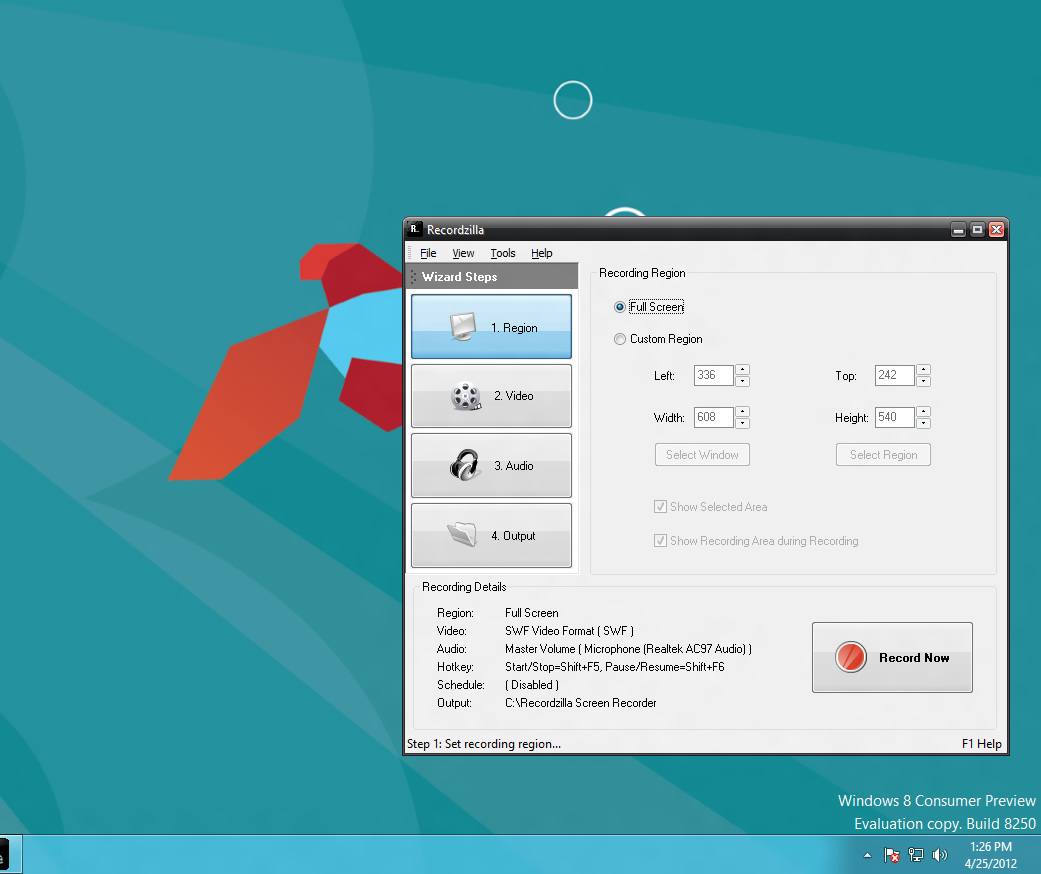
We are glad to announce that our products (Dexster, Videozilla, Photopus Pro, Snosh, Audiozilla, Recordzilla) are compatible with Windows 8 (32-bit and 64-bit). No major issues were found during the test. Of course, it is still early to do the real testing of our products on Windows 8. We'll be conducting the test again once the final release of Windows 8 hits the shelves.

Audiozilla Audio Converter running on Windows 8
Dexster Audio Editor running on Windows 8
Photopus Pro running on Windows 8
Recordzilla Screen Recorder running on Windows 8
Snosh running on Windows 8
Videozilla Video Converter running on Windows 8 


Tuesday, January 24, 2012

Videozilla Video Converter 3.4 - new released

We have a brand new version 3.4 of Videozilla Video Converter. This version fixes important bugs that will lead to conversion failure of source video MOV, MP4, 3GP, and M4V with the latest Quicktime player installed. It is recommended to update to this version. Learn more about recent updates at http://www.videozilla.net/upgrade.html

 Version Summary: 
  • Fixed: Unable to convert source video MOV, MP4, M4V, 3GP with the latest QuickTime player installed. 
  • Improved: All other minor bugs found in previous version


Wednesday, December 21, 2011

Videozilla Video Converter 3.3 - Just Released!

We are pleased to announce the release of Videozilla 3.3. Videozilla 3.3
included a new feature which allows you to use source's video folder as  
output location. You can now convert and save video files to the source's
video folder.

Facebook video profiles/presets are available in this release. This will
help you to create video that Facebook support without worrying about video format or settings
to be used. 

Version 3.3 also incorporates fixes for reported bugs, improved the support of old mov video
and minor interface design updates for better user experience. Please visit
http://www.videozilla.net/upgrade.html to learn more about recent updates.

New features and changes in version 3.3:
  • Option to use source's video folder as output location new
  • Video bitrate settings for 3GP, MPEG-4, and MOV new
  • Video profiles/presets for Facebook video new
  • Fix: Incorrect converted video location
  • Improve: Minor interface design
  • Improve: Stability to support old MOV video
  • Command-line: New Flag to use source's video folder as output
  • Command-line: New Flag to set video bitrate for 3GP, MPEG-4, and MOV
  •  Help manual and command-line manual updates


Learn more: http://www.videozilla.net


Monday, November 22, 2010

Videozilla Video Converter 3.2 - New

Have you ever wondered how to upload your favourite video in Youtube but unsure of what type of setting and video format to use? Videozilla 3.2 is the answer! Videozilla version 3.2 can convert your video into Youtube compatible formats in no time. This new release includes special profiles/presets to convert your video for sharing on Youtube.

The new version of Videozilla improves WMV encoding speed. You can expecting the speed to be at least 2x faster than the previous version. WMV 9 encoding is now supported. 

Putting Flash SWF/FLV video on your website is now much easier with Videozilla 3.2. This new release also includes an option to generate SWF/HTML loader for loading the converted Flash SWF/FLV video on your website. 

To learn more about latest updates, please visit: http://www.videozilla.net/upgrade.html

What's new in version 3.2?  
1. Video profiles/presets for Youtube video (NEW)
2. Option to generate html and swf loader for Flash SWF / Flash FLV (NEW)
3. Support WMV 9 video format encoding (NEW)
4. Improvement 2x speed for WMV encoding
5. Improvement over MP4, M4V video support
6. Improvement over multiple instances of conversion
7. Fixes Interface design bugs in Windows 7 (64-bit)
8. Help manual and command-line manual updates

Learn more about Videozilla: http://www.videozilla.net


Related Posts Plugin for WordPress, Blogger...