Showing posts with label photopus pro. Show all posts

Wednesday, April 25, 2012

Windows 8 Support in Softdiv Products

As you probably know, Microsoft will be releasing the new Windows 8 by this year. Since the consumer preview version of Windows 8 is already available, we managed to download and performed a test run of our products on Windows 8 (32-bit and 64-bit).

We are glad to announce that our products (Dexster, Videozilla, Photopus Pro, Snosh, Audiozilla, Recordzilla) are compatible with Windows 8 (32-bit and 64-bit). No major issues were found during the test. Of course, it is still early to do the real testing of our products on Windows 8. We'll be conducting the test again once the final release of Windows 8 hits the shelves.

Audiozilla Audio Converter running on Windows 8
Dexster Audio Editor running on Windows 8
Photopus Pro running on Windows 8
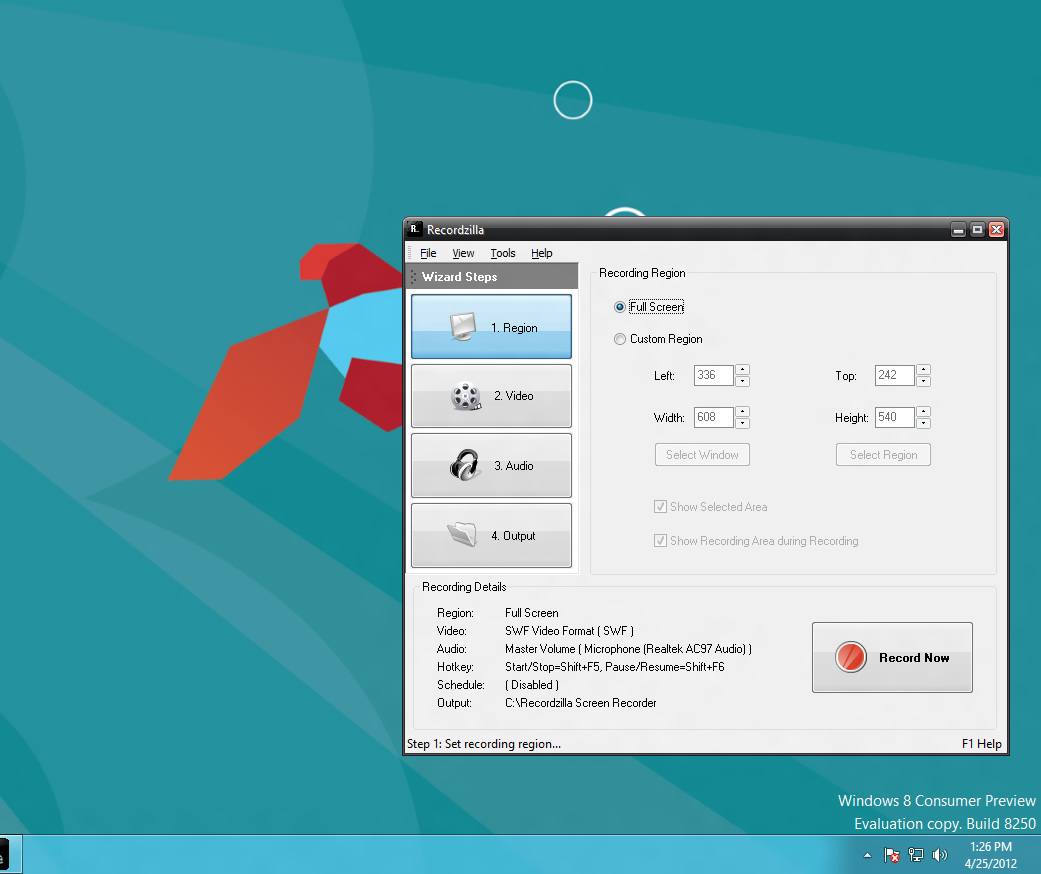
Recordzilla Screen Recorder running on Windows 8
Snosh running on Windows 8
Videozilla Video Converter running on Windows 8 


Sunday, November 13, 2011

Protect Your Photo With Watermark

 A photo watermark is a mark that is put on a photo to identify the owner, maker or artist. It is a simple way of indicating that the rights of the photo solely belong to the holder. There are many things that you can use as a watermark. If you like, you can indicate your website, business name, year or even your name. It is very important to have a watermark on your photo as it helps in preventing the unauthorized use of your work or use without attribution.

These are some important things to consider in the successful use of a photo watermark:
  • Use only one color in the watermark. This helps the viewer not to be distracted by the watermark.
  • Make the watermark to be a simple one, especially if you would like to make it appear on the entire image.
  • Let it be on one line at the corner of the photo.

Photopus Pro is a very good photo watermark software that can help to brand your photo. Photopus Pro is a new software that is gaining popularity, helping thousands of people to protect their works. With this software, you can:
  • Automatically resize images
  • Automatically rotate images to landscape or portrait.
  • Automatically flip images horizontally or vertically
  • Automatically crop images

In terms of image converting, Photopus Pro helps you to:
  • Convert your images from one format to another. It supports more than 90 formats of images.
  • Convert your images from RAW digital camera such as Sony, Kodak, Olympus, Nikon and Canon.
  • Create multi-page TIFF or PDF from multi-page images

Photopus Pro can do all those things for you within seconds. It is the solution for all issues relating to photo watermark. Once you have added text to your photos you can set text font, align mode and back color. The textbox position can also be set relative to the corners of the image. The software combines efficiency and simplicity and makes you to enjoy the process of applying or creating a watermark many files in multiple directories. The software supports a mixture of drawings, graphic and text watermark of any complexity. The settings for multi-level transparency enable you to preview and choose how your photos are affected by the watermark. If you are busy, it also enables you to save your projects to be reused later. Therefore, it is a good software that can help in protecting your works.

Learn more about Photopus Pro at http://www.photopus.net

Monday, February 21, 2011

Introducing Photopus Pro

Photopus Pro is an easy to use batch image processing software to simplify the process to convert, add watermarks (text and image), resize, transform, touch-up, rename, and apply effects to your digital images

Instead of spending hours to edit your digital images individually, Photopus Pro lets you perform batch image processing in a single operation. With Photopus Pro, you can batch resize images automatically with ready preset for most common output sizes; Rotate images; Flip; Rename images; Crop images; Add watermark text or image to your images; Convert image to other image formats (including multi-page PDF, TIFF); Adjust DPI; Apply special effects like black and white, sepia, blur, emboss, red eye correction, twirl, grayscale, add border and more; Touch-up images by adjusting brightness, contrast, sharpen, smooth, color balance and etc.

Photopus Pro comes with clean and well designed interface. It only involved 3 steps to process your images: Add Photos, Add Filters, Output. Through every step of the process you can preview the changes made before saving the images. Settings can be saved and load for next image processing project.

Photopus Pro supports over 90 images formats including BMP, JPG, GIF, TIFF, TGA, PNG, ICO, PDF, PDF/A, PSD, WMF, EMF, JBIG, JBIG2, WBMP, PICT, PCT, JNG, JPEG 2000, PIC, ICB, VDA, VST, PDD, WAP, WBM, EXR, PNM, PBM, PGM, PPM, XPM, 3FR, ARW, BAY, GMQ, CAP, CR2, CRW, CS1, DC2, DCR, DCS, DNG, DFR, ERF, FFF, HDR, IIQ, K25, KC2, KDC, MDC, MEF, MOS, MRW, NEF, NRW, ORF, PEF, PTX, PXN, QTK, RAF, RAW, RDC, RW2, SR2, SRF, STI, CUR, CUT, DDS, DIB, FAX, HDR, IFF, BIE, JBG, JB2, JIF, KOA, LBM, MNG, PCD, PCX, PFM, PGM, RAS, SGI, RLE, XBM, IA, EXIF, JTIF and etc. RAW camera files and multi-page image format is fully supported.

Learn more about Photopus Pro: http://www.softdivshareware.com/photopuspro.html


Related Posts Plugin for WordPress, Blogger...