Showing posts with label recordzilla. Show all posts

Thursday, April 02, 2020

Recordzilla Screen Recorder 1.7 Released

We are pleased to announce the release of Recordzilla Screen Recorder 1.7 which is available for download at https://www.softdivshareware.com/recordzilla-screen-recorder.html . This version fixes major bugs and issues that might prevent Recordzilla from working in Windows 10. This includes run time errors, program sizing issue, and problem to save as WMV video format when the audio device is not present. We recommend that all existing users to upgrade to this version. To learn more about recent updates, kindly visit http://www.softdivshareware.com/recordzillaupdates.html

Recordzilla Screen Recorder 1.7

Version Summary:
1) Fixed: Permission issue in Windows 10
2) Fixed: Program not sizing correctly in Windows 10
3) Fixed: Run time error when there is no audio device available
4) Fixed: Problem to save screen recording as WMV video format
5) Updated: User manual

Website:
https://www.softdivshareware.com/recordzilla-screen-recorder.html

Download:
http://netdna.recordzilla.com/recordzilla.exe

Buy Now:
https://www.softdivshareware.com/buy-recordzilla.html


Monday, November 04, 2013

Recordzilla Screen Recorder 1.5 - new released

We are proud to announce a brand new version of Recordzilla Screen Recorder 1.5 is now available for immediate download at http://www.softdivshareware.com/recordzilla-screen-recorder.html .

Recordzilla Screen Recorder 1.5 introduces two new features; AutoPan (the recording area will follow the mouse pointer to wherever it goes) and Mouse Pointer Highlight (this will highlight the mouse pointer with a colored circle and keep your audience’s focus to a particular part of the screen recording). Other improvement in version 1.5 includes the replacement of eye-friendly color for the region selector.

The new Recordzilla 1.5 incorporates the following fixes; watermark text/image display issue and invalid height value upon start up.

Please visit http://www.softdivshareware.com/recordzillaupdates.html to learn more about recent updates.

autopan and mouse highlights
Autopan and mouse highlight features in Recordzilla 1.5


New features and updates in version 1.5:
(1) New: Autopan Feature new
(2) New: Mouse Pointer Highlight feature new
(3) Fixed: Invalid height value
(4) Fixed: Watermark Text / Image not showing on the recorded video
(5) Improved: Minor design updates
(6) Updated: Help manual


Free Download:
http://netdna.recordzilla.com/recordzilla.exe

Website:
http://www.softdivshareware.com/recordzilla-screen-recorder.html

Version History:
http://www.softdivshareware.com/recordzillaupdates.html


Wednesday, April 17, 2013

Recordzilla 1.4 - New Screen Draw feature

Screen Draw
Screen Draw feature in Recordzilla 1.4
We are proud to announce that a new version of Recordzilla Screen Recorder was released today. Version 1.4 of Recordzilla Screen Recorder can be downloaded from http://www.softdivshareware.com/recordzilla-screen-recorder.html . We've added new "screen draw" feature in this release. You may now add drawing effects with different colors over the screen as you record. 

Recordzilla 1.4 also introduces a new option to hide Desktop icons while recording. This will temporarily create a blank desktop and help for better screen recording. Other improvements in this version include interface GUI update with a new set of icons which are bigger, cleaner and smoother. 

Version 1.4 also incorporates fixes for hotkeys bugs and other minor bugs found in previous version.

Please visit http://www.softdivshareware.com/recordzillaupdates.html to learn more about recent updates.


New features and updates in version 1.4:
(1) New: Draw to Screen Feature new
(2) New: Option to hide Desktop icons during screen recording new
(3) Fixed: Hotkey bugs
(4) Fixed: Minor bugs found in previous version
(5) Improved: Interface GUI with bigger icons
(6) Updated: Help manual


Thursday, October 11, 2012

How to split lengthy screen recording

With the new Recordzilla Screen Recorder 1.3, you can now split a screen recording into multiple files according to the video duration defined. This feature is very useful particularly you would like to perform a lengthy screen recording and break the recording into pieces.

split lengthy screen recording
Multiple File Recording feature in Recordzilla Screen Recorder 1.3


To enable the multiple file recording feature, click on the 4.Output button and check the check box "Enable Multiple File Recording". You can then specify the length for each split in minute. When you start the screen recording, Recordzilla will automatically split the recording according to the time entered.

Please visit http://www.softdivshareware.com/recordzillaupdates.html to learn more about recent updates.

 New features and changes in version 1.3:
(1) New option for multiple file recording.
(2) New option to configure AVI Video Compressor
(3) Fixed: Screen recording freezing issue when a particular AVI video Compressor is selected
(4) Fixed: Minor bugs found in previous version
(5) Improved: Minor GUI update
(6) Updated: Help manual 


Website: http://www.softdivshareware.com/recordzilla-screen-recorder.html

Download: http://netdna.recordzilla.com/recordzilla.exe

Version History: http://www.softdivshareware.com/recordzillaupdates.html


Wednesday, May 23, 2012

Recordzilla Screen Recorder 1.2 - New Released!

We are pleased to announce the latest version of Recordzilla Screen Recorder 1.2 is now available for download at http://www.softdivshareware.com . We've added new features that allow you to add watermark text or image on the screen recording. Watermarks can be used for video protection purpose, to create brand awareness, or adding comments to the video.

Recordzilla 1.2 is now compatible with Windows 8 (consumer preview edition). Bugs that we found in previous version and Windows 8 have been fixed in this release.

Please visit http://www.softdivshareware.com/recordzillaupdates.html to learn more about recent updates.

New features and changes in version 1.2:
(1) New option to add overlay image
(2) New option to add overlay text
(3) Fixed: HTML page not automatically created
(4) Fixed: Region selector window can't be expanded
(5) Improved: Recordzilla now runs on Windows 8 (32-bit / 64-bit)
(6) Improved: Minor GUI update
(7) Improved: All other minor bugs found in previous version
(8) Updated: Help manual


Download: http://netdna.recordzilla.com/recordzilla.exe

Version History: http://www.softdivshareware.com/recordzillaupdates.html


Wednesday, April 25, 2012

Windows 8 Support in Softdiv Products

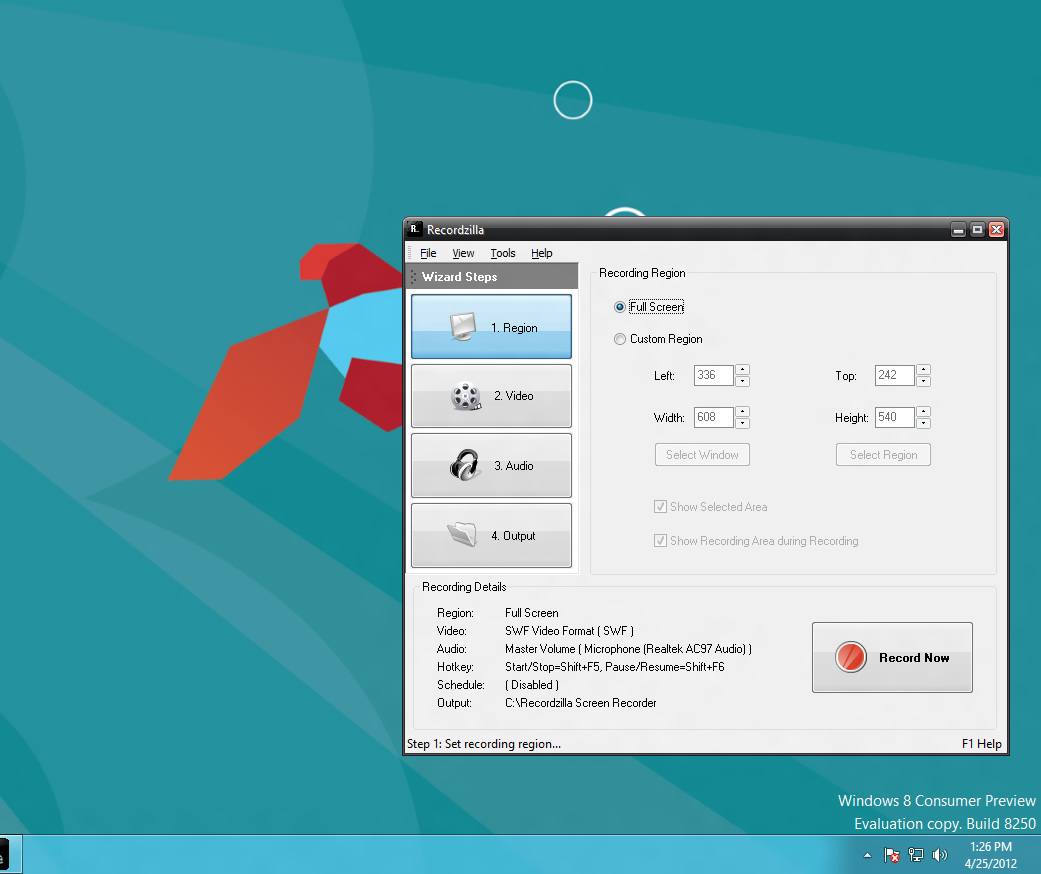
As you probably know, Microsoft will be releasing the new Windows 8 by this year. Since the consumer preview version of Windows 8 is already available, we managed to download and performed a test run of our products on Windows 8 (32-bit and 64-bit).

We are glad to announce that our products (Dexster, Videozilla, Photopus Pro, Snosh, Audiozilla, Recordzilla) are compatible with Windows 8 (32-bit and 64-bit). No major issues were found during the test. Of course, it is still early to do the real testing of our products on Windows 8. We'll be conducting the test again once the final release of Windows 8 hits the shelves.

Audiozilla Audio Converter running on Windows 8
Dexster Audio Editor running on Windows 8
Photopus Pro running on Windows 8
Recordzilla Screen Recorder running on Windows 8
Snosh running on Windows 8
Videozilla Video Converter running on Windows 8 


Thursday, September 29, 2011

Recordzilla Screen Recorder 1.1 - New

We are pleased to announce the release of Recordzilla Screen Recorder 1.1. The latest release feature greatly improved performance over past version bringing a better region selection tool. This fixes the problem to click-through the selected region area and screen white-out issue when Windows Aero theme is enabled in Windows Vista or 7.

Another important fix in this release is the run time error '13'. This error happened on second execution onwards especially on non-english based Windows. We are glad to announce this has been fixed.

A new option to create html page is now available when you output the recording as SWF video. This will save your time from creating the html page manually. Please visit  http://www.softdivshareware.com/recordzillaupdates.html for more info about recent updates.

New features and changes in version 1.1:
  • Option to create html page when output recording as swf video new 
  • Fixed: Run time error '13'
  • Fixed: Unable to click inside the selected region area when Windows Aero theme is enabled
  • Fixed: Screen white-out issue when Windows Aero theme is enabled
  • Fixed: Incorrect Auto-Save output location
  • Fixed: All other minor bugs found in previous version
  • Updated: Help manual


Learn more about Recordzilla at http://www.softdivshareware.com/recordzilla-screen-recorder.html

Thursday, October 14, 2010

Introducing Recordzilla Screen Recorder

Capture video, audio and pictures of anything you see on your computer screen and save it as video AVI, WMV, Flash SWF, or Flash FLV with Recordzilla, the brand new software from Softdiv.

You can use Recordzilla to record the entire desktop, active windows, any portions of the screen, mouse cursor's movement, menus, games, and even video with sound. You can also use Recordzilla to record from microphone to add narration to your recordings, or record what you hear from the computer speakers. Advanced features includes time stamp your videos, schedule a recording, hotkeys, adjust video resolution, size, and frame rate. Recordzilla is useful for creating training videos, presentations, demos, recording streaming video eg. Youtube, recording webcams from AIM, Skype, ICQ, MSN Messenger, Yahoo Messenger or capture movies from TV card, DVD, VCD

What can you do with Recordzilla Screen Recorder?

1. Desktop Screen Recording

2. Record Webcams

3. Create Training Videos, Presentations, Demos

4. Online Video Recording eg. Youtube

5. Games Recording

6. Record Movies from TV card, DVD, VCD

7. Schedule Recording

8. HotKeys Shortcuts

9. Date & Time Stamping Recording

10. Audio Recording

Learn more about Recordzilla : http://www.softdivshareware.com/recordzilla-screen-recorder.html
Related Posts Plugin for WordPress, Blogger...